An A record connects a name to an IPv4 address — four numbers separated by dots, such as 203.0.113.10. It is how visitors' browsers find the server your website is on.
Add an A record
- Open the domain's DNS records: Domains → the domain → Manage DNS.
- Under Add a record, choose A.
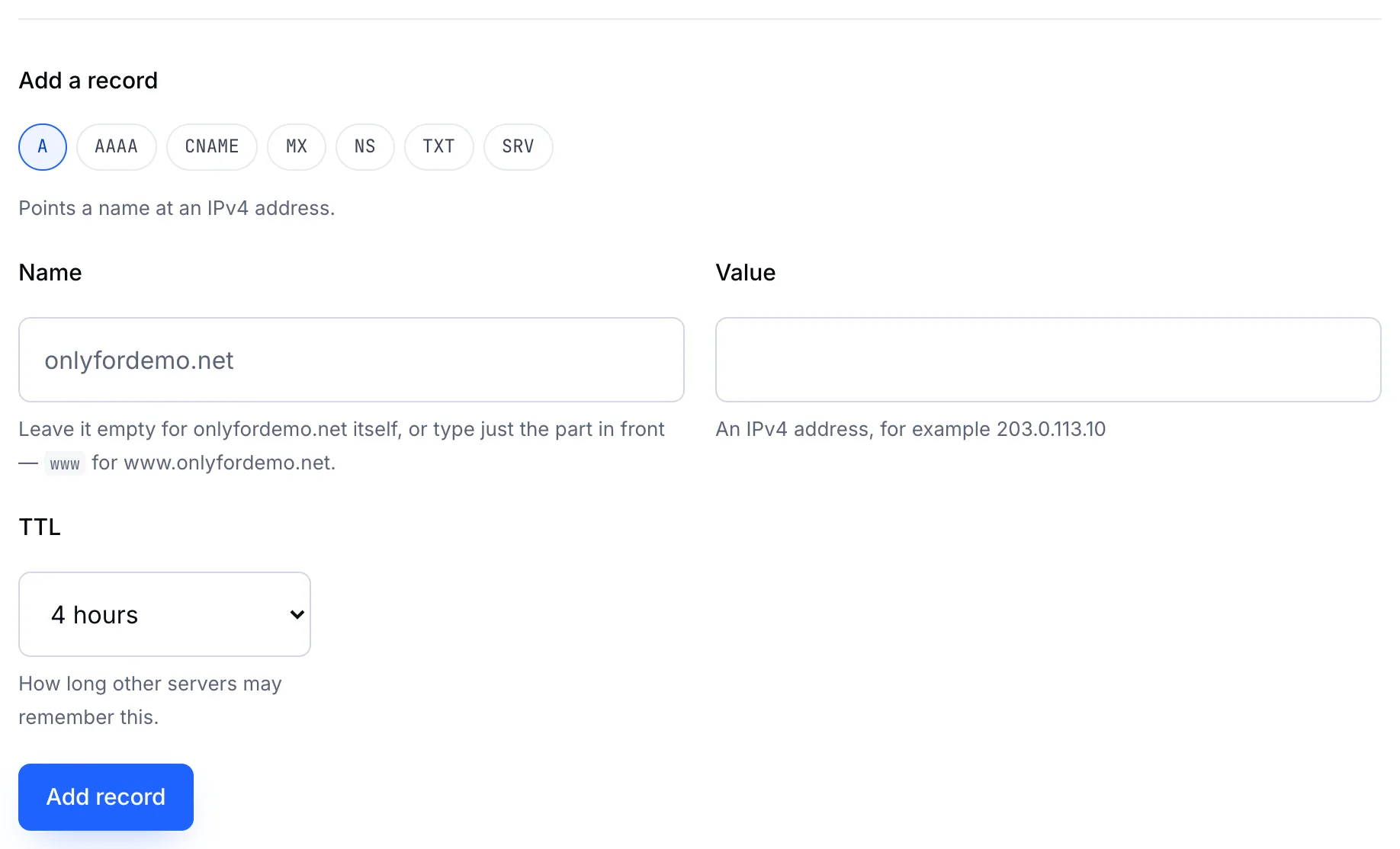
- Name — leave it empty for the domain itself (
yourdomain.com), or type the part in front, such aswwworshop. - Value — the server's IPv4 address.
- Choose a TTL and click Add record.
Common set-ups
| Name | Value | Result |
|---|---|---|
| (empty) | 203.0.113.10 | yourdomain.com goes to that server |
www | 203.0.113.10 | www.yourdomain.com goes to the same server |
* | 203.0.113.10 | Every subdomain that has no record of its own goes there (wildcard) |
Tip
Want www to follow the main domain automatically? Use a CNAME record for www pointing at yourdomain.com instead of a second A record. Then you only ever change one address.
Note
A name can have several A records. Visitors are sent to each address in turn — a simple way to spread load across two servers.